
- Article
- |
- Techniques / Materials
The Importance of Using Dental Templates
As dental schools increasingly pivot toward digital technologies, the tactile skills crucial for understanding tooth anatomy and mastering clinical procedures risk being overshadowed. This shift underscores a growing gap in dental education — one where hands-on experience with dental templates and manual techniques becomes invaluable. Recognizing this challenge firsthand, I embarked on a journey with Spear Education to bridge this divide.
The growing dental educational gap
As anyone who graduates from four years of predoctoral dental education can attest, dental schools do not and cannot teach how to handle all the nuances and complexities of clinical dentistry, let alone essential aspects of the business side of practice. There are not enough cases, lab work, and time to distill the wisdom that a seasoned dentist accrues over a lifetime of clinical successes and failures.
Not knowing this, and with my parents not being dentists, I had just assumed that once I was done with dental school, I would be a fully fledged doctor ready to handle any patient situation walking through the door. But as graduation grew near, it became increasingly apparent that I was just scratching the surface, and that dental school would be just the start of an exciting journey of self-discovery and quality continuous education.
Not only is there a limitation in what can be taught in this brief period of time, but it is important to note that the dental schools of today are not the dental schools of the past. With the advent of newer digital technologies, fewer and fewer schools are incorporating the degree of lab work done previously by dental students. Wet labs are being gutted and turned into CAD/CAM rooms. Wand scanners are replacing alginate and PVS.
While I work in a cutting-edge digital practice and love the digital advancements that are the future of dentistry, the fact remains that fewer and fewer new graduates know how to wax up teeth with their hands and not just on a screen. This robs them of the opportunity to truly appreciate tooth form, shape, and anatomy with tactile, hands-on experience and muscle memory development. Additionally, more dentists are entering the workforce and fewer lab technicians are being trained. This is leading to a bottleneck in not just the fabrication of quality prostheses but also the understanding of the steps needed to better:
- work with dental labs and/or quality check the returned work, and
- personally do the lab work for same-day crowns or in-house digital dentures.
The reverberations of these trends in dental education and the workforce affect us directly or indirectly. So, what can be done to mitigate this educational gap in a world where time is of the essence and not everyone can afford to go back to school to attend a three-year residency program?
Treatment Planning With Confidence
Because of this unequivocal need for more learning and training after dental school, I’ve found the most transformative courses to be workshops I’ve taken. World-renowned Spear Faculty member and prosthodontist Dr. Greggory Kinzer said that going through the Spear Core Curriculum workshops is like a “mini-prosth residency” without the late nights and at your convenience and pace, and I agree.
The first step of this hands-on core curriculum is the Treatment Planning With Confidence (TPWC) workshop, which fundamentally changed how I do my comprehensive exams. It also gave handy tips and tricks to improve treatment planning and case acceptance that I could return to the office on Monday. The most useful of these tips was using dental templates to make treatment planning more efficient and predictable.
Dental templates and iPad use for faster treatment planning
Being able to ascertain where the maxillary anterior teeth should be within the framework of the face and lips is the cornerstone to success in restorative dentistry.
This idea is the foundation of the facially generated treatment planning (FGTP) philosophy, as described in the TPWC workshop. In this approach, we first determine where the maxillary centrals should be placed; then orient the rest of the maxillary dentition to complement #8 and #9, based on the various principles of smile design (maxillary central display in repose, golden ratios, gingival levels, smile line, etc.); and then arrange the mandibular teeth based on functional restraints and other important considerations like occlusion and airway.
But what methods can we use to visualize the ideal placement of teeth in three-dimensional space before drilling? In the analog world, making stents from physical wax-ups on casts to try in the mouth as a mock-up is a perfectly valid method. In the digital world, software systems such as Exocad or 3Shape can be used to digitally “wax up” teeth. These casts can then be 3D-printed and stents from which mock-ups can be made can still be fabricated.
However, before you or your lab waxes up teeth using digital or analog methods, visualizing tooth placement relative to soft tissues is crucial for achieving a better final prosthesis. One effective method for this is using tooth templates. In TPWC, we learned how to superimpose these templates onto clinical photographs to help us better visualize ideal tooth placements. For me, one of the most valuable parts of the course was learning an efficient and user-friendly way of doing this via the powerful photo editing software Procreate, which is available as an iPad app.
Demystifying the smile using the Procreate app
Before the TPWC workshop, I had never used the Procreate app. I found that while software such as PowerPoint and/or KeyNote can also be used to overlay teeth templates onto dental photographs, what I like about using Procreate is that you can seamlessly edit the photographs to better see the possibilities to determine the indicated treatment(s). It is also capable of functions not possible with PowerPoint or KeyNote.
Below is a brief summary of how I used Procreate when analyzing a case, and how it can be incorporated into daily dental use.
Getting images into Procreate
First, I imported the patient photos into the app using the iPad’s multitasking feature. Then, using a split screen, I dragged images from Dropbox into Procreate, then cataloged photos into a stack and renamed the stack using the select button.
Editing photos
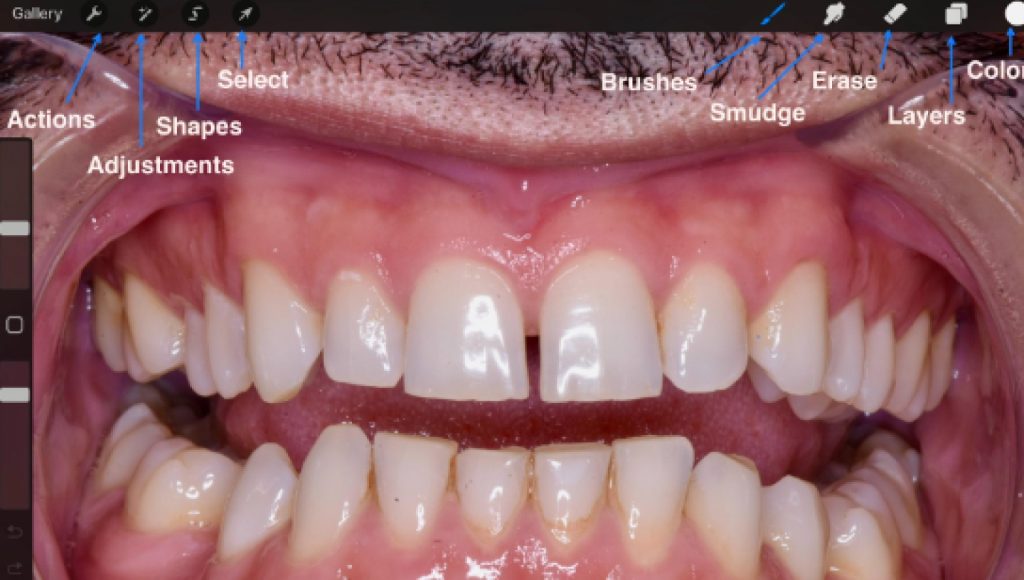
I tweaked the photos using a combination of the following tools.
- Actions: This tool allows you to insert files or photos, as well as export your work.
- Adjustments: Includes tools like “liquify” to morph images, useful for procedures like crown lengthening or orthodontics.
- Shapes: Enables drawing directly on the picture.
- Select: Allows you to select, resize, shape, or move elements within the image.
- Brushes: Adjust opacity and pen size, change ink color using the color button.
- Smudge or Erase: Functions for blending or removing elements.
- Layers: Organizes imported templates and other elements into layers.
- Reset or Undo: Easily revert changes using the undo feature.
Drawing
You can either freehand when drawing on the picture or use the “drawing assist” feature of the Apple Pencil on the app to draw only straight lines, which can be useful to assess golden proportions.
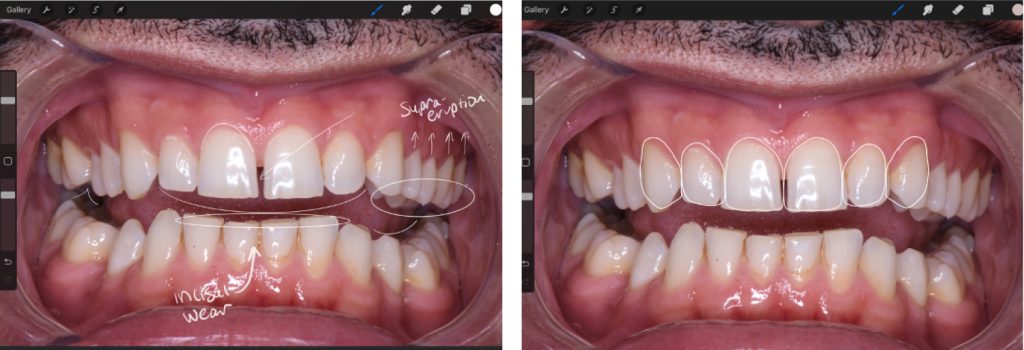
Incorporating the templates
TPWC workshop participants were provided with maxillary and mandibular tooth templates. I dragged the maxillary anterior tooth templates into the layers to analyze the patient’s smile and determine which procedures would be necessary to achieve a more esthetic result.
Dental photography: The basis for communication and creation
The difference between “good enough” and “great” in clinical dentistry can be made significantly simpler by taking and utilizing good-quality photographs.
When doing a comprehensive exam on more dentally complex patients, I’ve found that getting a good-quality photo series is essential. When used with the proper templates, it can serve as an excellent blueprint for more predictable and astute treatment planning.
Dental photography has the potential to dramatically improve your work experience as a clinical dentist, whether it’s used for improved case presentations and marketing, for improved lab communication to idealize prostheses, for interprofessional collaboration to tackle cases, or to facilitate more accurate and efficient treatment planning.
By overlaying dental templates onto these photographs with photo editing software such as the Procreate app on an iPad, we can better actualize and more easily execute prosthetically driven treatment planning to achieve the ideal end goal.
SPEAR campus Workshops
Step Into a Place Built for Mastery
Step away from the noise of practice and into focused, immersive training that changes how you think, diagnose, and lead.

By: Leila Zadeh
Date: September 24, 2024
Featured Digest articles
Insights and advice from Spear Faculty and industry experts